


Connect Shopify and Postnord

The app cost starts from $10 to 60$

Price covers the cost for the Shopify app that connects your store to Postnord. Please contact Postnord for price for their services.

Shopify Postnord App – integration for Skicka Direkt Business

This app is for you using Postnord’s shipping services with the Skicka Direkt Business (SDB) system for your Transport Management, and want to save time on creating the shipping labels. You can use the automatic sync feature for letting the app instantly sync orders to SDB or do the sync manually if you prefer to control everything yourself.

The app is compatible with all delivery methods, i.e. delivery to mailbox, door, service point and parcel lockers. The app can show the delivery methods directly in Shopify Checkout to let the consumers select their preference, or you can limit the exposed choices for consumer and instead manually retrieve and use valid delivery methods from your personal SDB account.

With Skicka Direkt Business your company can order shipments and pick-up. The service is built so that you should be able to quickly and easily choose the shipping method that suits your specific needs. You won’t have to have deep knowledge in services or shipments in order to deliver to your customers. You manage your templates easily in the tool and get a good overview of all your shipments and events connected to them. 

Postnord App Information Hub

Documentation

In our Postnord for Shopify documentation, you'll find answers on how to configure and get started with the app. You'll also find information on how to adjust the app and set it up.

Documentation

Contact Support​

Need help with Postnord for Shopify? We're here for you! Click the support link below or check out our documentation for quick answers. You can also chat with us live—our team is available from 6 AM to 2 PM (CET), Monday to Friday. We’re happy to assist you!

Support

2026-05-08, Bug fix: Fixed CN22/CN23 not submitted for stores with VOEC number

2026-05-06, Improvement: 14-days trial not applying for new installs

2026-04-28, Improvement: Checkout UI — Service Point Dropdown & Order Attribute Fix

2026-04-04, Improvement: Direct Backend URL Access Error Resolved 

2026-03-17, Improvement: Implemented subscription validation and billing redirect

2026-03-09, Improvement: Account Settings tab UI improvements and booked status column added in Orders tab

2026-02-13, Improvement: PostNord CLI app commercial invoice issue resolved

2025-11-24, Improvement: PostNord CLI app issue with forced USD currency for US customs declarations resolved

2025-11-18, Improvement: PostNord CLI app VOEC field saving as null in customs settings issue resolved

2025-11-17, Improvement: Resolved error message "App may not work as expected"

2025-11-04, Improvement: PostNord online chat widget updated

2025-10-23, Improvement: Partner logo updated in Account Settings tab

2025-09-08, Improvement: PostNord DK custom settings updated

2025-09-03, Improvement: Implemented PostNord deeplinking and resolved custom invoice issue in test mode

2025-08-25, Improvement: Improved auto-fulfillment when General Settings are disabled

2025-08-20, Improvement: Improved “Sync to PostNord” action on Shopify order page

2025-08-18, Improvement: Added PostNord service name to Shopify order note attributes

2025-08-08, Improvement: PostNord sync tagging system and auto-fulfillment on label generation

2025-07-24, Improvement: Account settings server issue resolved

2025-07-22, Improvement: Updated extension and checkout shipping options for Denmark integration

2025-07-21, Improvement: Improved Order Detail → Sync to PostNord link

2025-07-16, Improvement: Dashboard API 500 issue resolved

2025-07-15, Improvement: UI improvements in mapping and Orders tab

2025-07-10, Improvement: Denmark integration and language support added

2025-06-18, Improvement: Sorting of shipping options improved using delivery customization API

2025-05-08, Improvement: Sorting of shipping options improved with km prefix

2025-04-28, Improvement: Shipping options now use order total_price to prevent shipment issues

2025-04-16, Improvement: Order booking flow updated

2025-04-14, Improvement: Amazon order weight sync issue resolved

2025-04-14, Tweak: Updated error message during order sync

2025-04-10, Enhancement: Improved error response handling from PostNord API

2025-04-08, Enhancement: Support chat integrated into the app

2025-04-01, Tweak: Fixed server error during booking, bulk booking, and label generation

2025-03-31, Tweak: Fixed label generation error

2025-03-24, Improvement: EventBridge and webhook-related issue resolved

2025-03-24, Improvement: Updated label and popup content in General Settings

2025-03-13, Improvement: Improved Safari support

2025-02-28, Improvement: Attribute settings updated

2025-02-25, Tweak: Bulk booking of orders enabled in Orders tab

2025-02-24, Tweak: Added zip code and city name to collection point options

2025-01-28, Improvement: Shipping option ETA and route distance formatting updated

2025-01-22, Enhancement: Improved error message for GET button usage

2025-01-22, Enhancement: Advanced email notification for quota limit

2025-01-17, Improvement: Subscription order service point issue resolved

2025-01-16, Improvement: Etsy order weight issue resolved

2025-01-16, Tweak: Email notification added for order sync quota limit

2025-01-10, Enhancement: Filter orders by country name added

2025-01-09, Improvement: Order weight added in Orders tab

2025-01-08, Enhancement: Email alert for order sync quota limit added

2025-01-08, Enhancement: Welcome email added during app installation and reinstallation

2025-01-07, Improvement: Auto-fulfillment feature implemented

FAQ

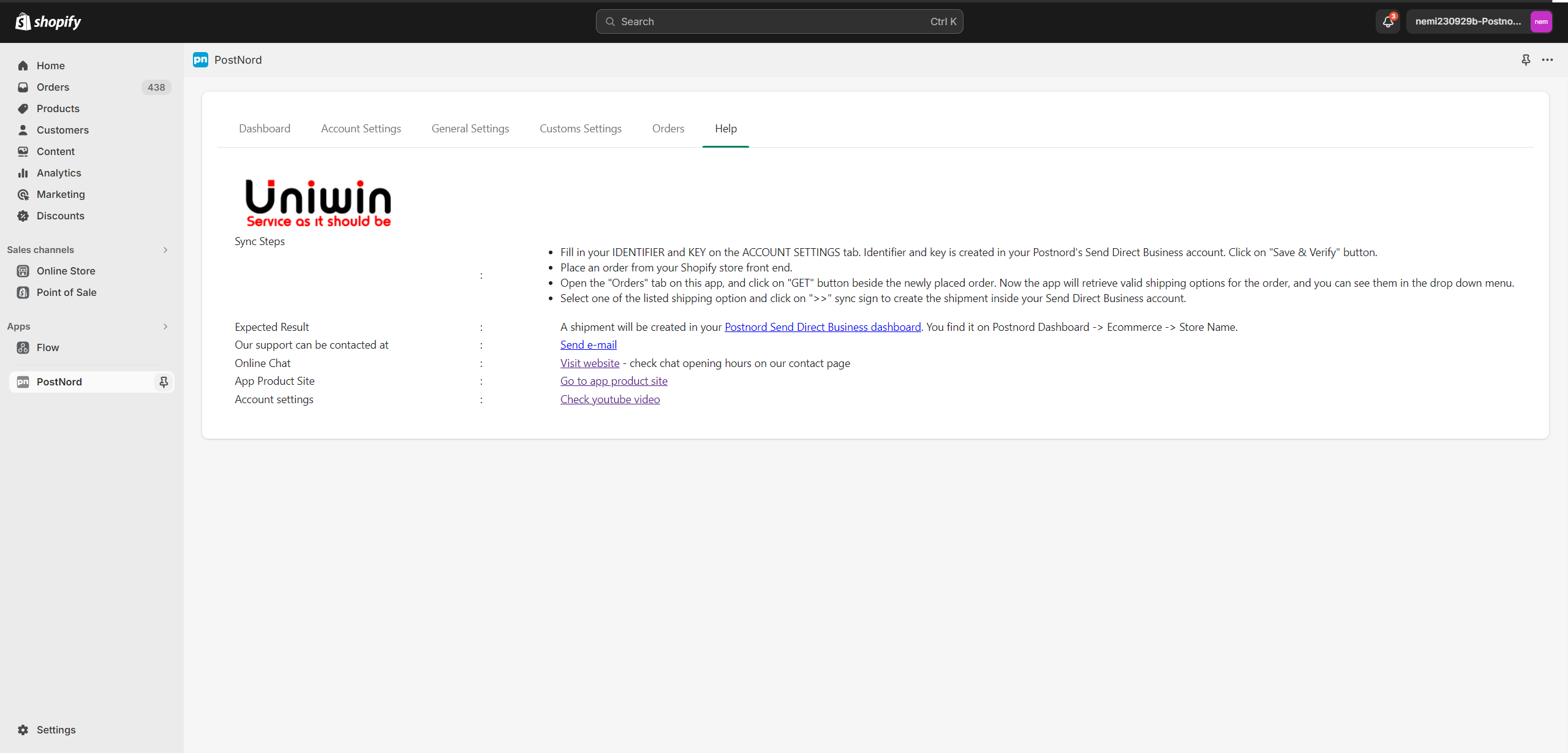
In Postnord’s Send Direct Business dashboard you can create a store. When this store is created you will get a page showing your Identifier and Key. These values must be saved on the “Account Settings” page in your Shopify Postnord App. If you forget to save the identifier/key when it is showed first time, then you have to delete the store and create and new store to get a new identifier/key.

Your account is missing this access right, please contact Postnord support for enabling this for you.

Only the last 60 days’ worth of orders from a store will be accessible from the order resource by default safety restriction on Shopify’s end.

We provide you free support on Online Chat and you can also create a support ticket by mailing to support@uniwin.se

Of course. You pay for each starting month.

Please contact us with your request, we will provide!

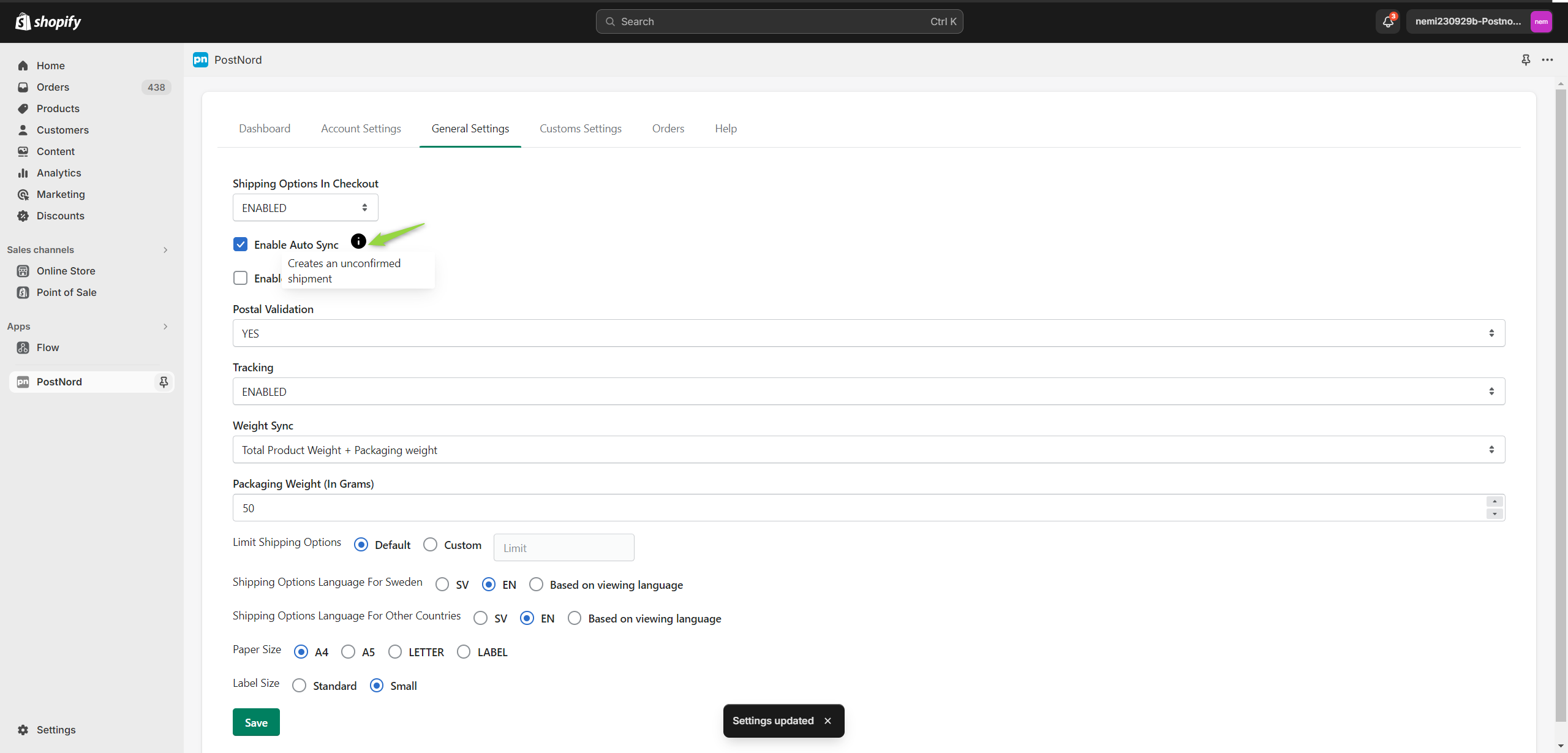
You have to enabled shipping options in checkout, as shown in image

If you are still facing issue with enabling shipping options at checkout page, please check this guide

https://uniwin.se/wp-content/uploads/2024/03/enable-shopify-carrier-service-api-2023-2.pdf

You can change it as your requirement, as shown in image

Yes, Our Postnord app allows you to print shipping labels from your Shopify dashboard

You have to install the app in each Shopify store in order to use it in multiple stores

You can limit shipping options by specifying the custom value in the below settings in our Postnord app. Further, the specified number of shipping options only will display for every service in your Shopify checkout section.

Since Shopify will sort the shipping options from lowest to highest shipping price, and then alphabetically. You cannot change or customize the shipping options at Shopify checkout page.

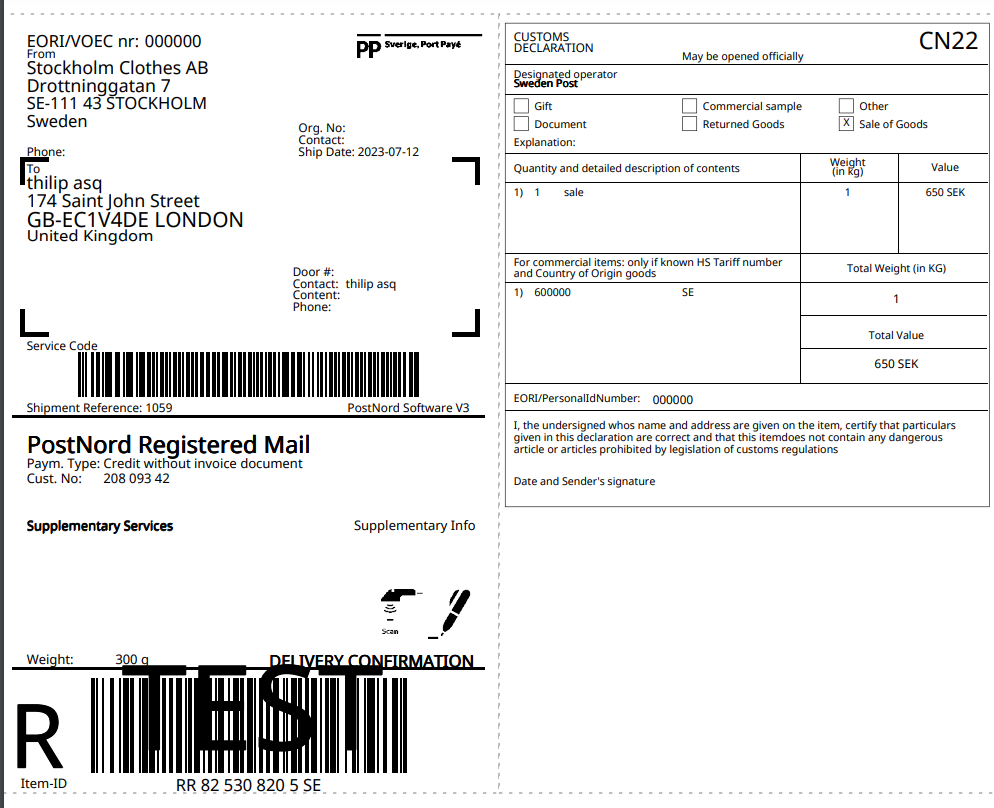
You can enable customs on the customs settings tab of the app, and you able to print the customs labels after book the orders from our Postnord app.

You can enable sort shipping options in checkout on the General Settings tab. The Shipping options will be sorted by distance.

Yes, of course. You can use our app on Shopify Basic plan. 

Yes, you can map Shopify shipping options with Postnord shipping options, then the orders will be synced automatically to Postnord.

You can enable auto sync and auto book on the General settings tab. To auto sync, orders should be placed by Postnord shipping options, so you can enable shipping options in checkout or add mapping.

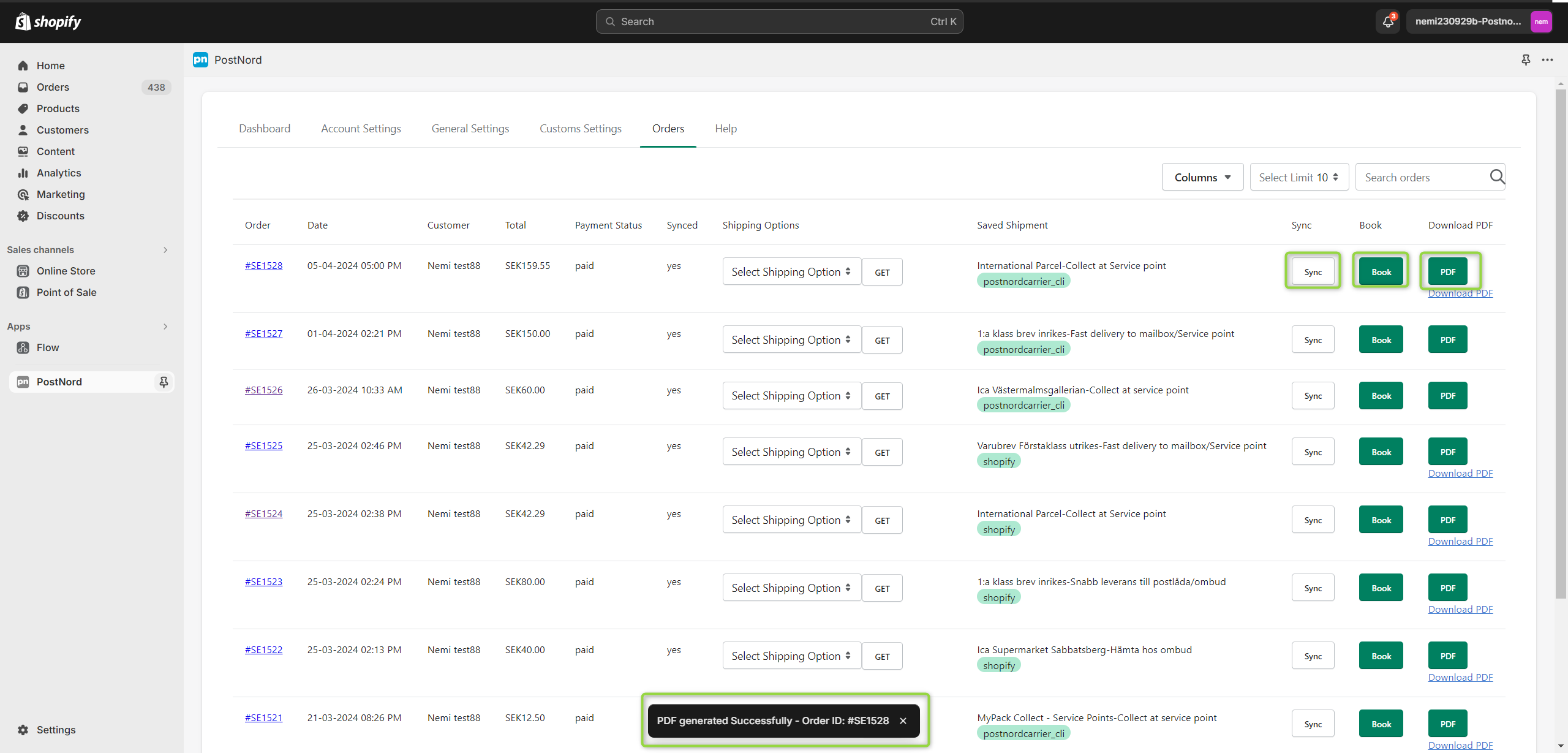
You can bulk sync your orders from Shopify orders page -> Select orders -> More actions -> Sync to Postnord, if the orders are placed by Postnord shipping options or you can go to “Orders” tab of the app -> Select orders -> Select Shipping option -> Click Bulk sync

You can bulk book the orders from Shopify orders page, select multiple orders -> More actions -> Generate Postnord Label, also it will create shipping labels or you can book the orders from Postnord portal, go to Send Direct Business -> Shipments -> Unconfirmed -> Select orders -> Confirm and Print

Yes, you can. Enable “Tracking” on the General Settings tab of the app. The tracking link will be added to the orders when your fulfill them. Make sure that you have booked the order to Postnord. 

Known Errors

Error message: There were some problem while installing the app, please re-install it.

Possible problem: You get this message when you try to access any one of this app’s feature or when you do any changes and give save in the app settings, but its been a while or opened the app page long time ago in Shopify.

Possible solution: Due to security purposes we have a short session span in our Shopify apps try to re-open the app so there won’t be issues. Otherwise try multiple browsers.

Try to select plan on supported browsers : Google Chrome, Microsoft Edge and Firefox on a PC

Error message: Please check shipping values

Possible problem: You are trying to sync an order to Send Direct Business but the app is not able to find a suitable shipping option in Send Direct Business for your Shopify order. This could happen if shipping methods are not configured in Send Direct Business, or if your order does not include a total weight for the order.

Possible solution: Please check if valid options are configured in Send Direct Business. Guidance is provided on section “Set up your delivery methods” and “Customize your delivery methods” on https://portal.postnord.com/info/en/delivery-guide/instructions-and-guides/connect-your-online-store-to-skicka-direkt-business/
Make sure that each products in your store has a valid weight.

Error message: Error verifying the API – The request requires user authentication

Possible problem: The provided Identifer/Key is wrong or you have you have selected “TEST” mode instead of “PRODUCTION”.

Possible solution: Check that your identifier/key is correct.

Identifier SAMPLE: ECS626AJM1IHBWXXNKB
Key SAMPLE: fca3da6fa3054f7087e23742dxxbfb6c

Check guide: https://portal.postnord.com/info/en/delivery-guide/instructions-and-guides/connect-your-online-store-to-skicka-direkt-business/
Or check video on our site.

Set mode = “PRODUCTION” and click “SAVE”

Error Message: An embedded page at pn1.uniwinapp.com says DataTables warning: table id=ordersTable – Invalid JSON response.

Problem/Reason: Shopify has a safety restriction for 3rd partly apps to not access orders older than 60 days by default. Postnord app is configured to the default restriction. For paging feature, a general restriction of max 250 record set by Shopify.

Solution: Just click OK for now. Alternative message in roadmap and workaround solution is being implemented.

To resolve this error message, go to the order on Shopify, check the postal code and correct it. Then sync the order again to Postnord. 

To resolve this error message, go to the orders page, click “GET” button and select the Postnord shipping option then sync the order to Postnord.

Go to Postnord portal -> Send Direct Business -> E-Commerce and click on your store name. And check the shipping options. If there is no shipping options, please add suitable shipping options.

To resolve this error message, please check your identifier and key are correct. And select Mode as Production. 

To resolve this error message, please go to Postnord portal -> Shipments -> Unconfimed and add weight to the order, then book the order. 

And avoid this error in future, add the weight to all products

It may cause several reasons. Carrier Service API not activated on the store.

  1. Carrier rates not added on the shipping zones 
  2. Shipping option on checkout is disabled on the “General settings” tab 
  3. Shipping options not configured on the Postnord portal
    • Shipping options only for personal customers configured, and shipping options for business customers not configured or only for business customers configured and shipping options for personal customers not configured 
    • Suitable shipping options not configured for selected country or not configured for the weight of the product
    • Disable the “Show this shipping service in the checkout” on Shipping service on the Postnord portal. 

Book the order to Postnord and click PDF

Check the order has booked to Postnord, if not book the order and fulfill again.